Claude Code, GitHub Copilot & OpenAI Codex | Cross-Compatible Prompt Structure
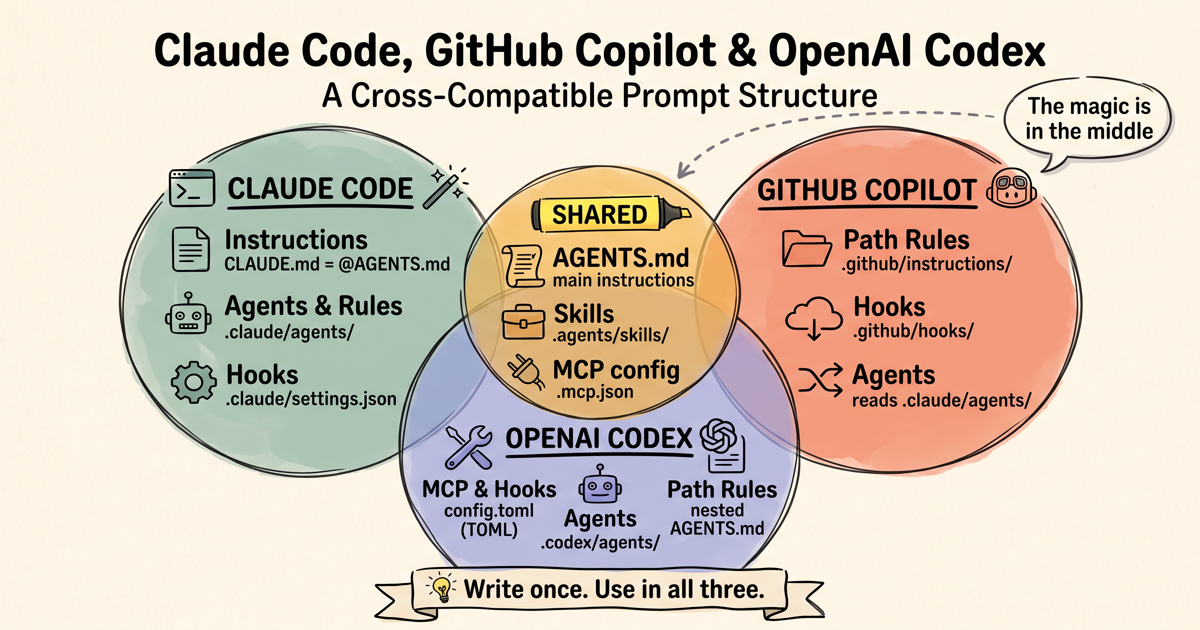
This post is an update to my earlier post, Claude Code & GitHub Copilot | Cross-Compatible Prompt Structure, now that I’ve added OpenAI Codex into the rotation. It’s written for anyone using all three, and it’s about the coding agents that work inside your local repository — Claude Code (CLI), GitHub Copilot in agent mode (VS Code and CLI), and Codex (CLI, IDE extension, or the ChatGPT desktop app) — all reading the same instructions, skills, and MCP configs without maintaining three copies. Standalone ChatGPT on the web is out of scope: OpenAI’s naming makes this confusing, but Codex working inside your repo is not the same as a ChatGPT conversation on the web, which doesn’t see your repo’s files at all (and skills you install in ChatGPT don’t sync to Codex automatically). If you only use GitHub Copilot and Claude Code, the previous post is the better fit — it covers those two without the extra Codex wiring.
I find myself fortunate (or token-rich, you might call it) to have paid GitHub Copilot, Claude Code, and OpenAI Codex subscriptions. Personally, I like that GitHub Copilot has all the different model options, but when it comes to price/token, I find that the plans of Anthropic and OpenAI are quite generous (mainly because of high competition between them). And so, I end up switching between these three tools. The main problem I have is that I need these three to follow the same set of system instructions, skills, MCP configs, and sub-agent prompts. In this post, I’m sharing my notes on the files and folders structure I’ve landed on.
A lot has changed in just a few months. AGENTS.md has become the common convention for repository instructions (it’s now stewarded by the Agentic AI Foundation under the Linux Foundation), and the SKILL.md-based Agent Skills format — originally developed by Anthropic and released as an open standard — has been adopted by all three tools. I recently restructured this blog’s own repository to follow the setup below, so the examples are from a real, working repo.
What’s Shared (The Good News)
AGENTS.md — Your Main Instructions File
With three tools in play, I keep the source of truth in a single AGENTS.md at the repo root:
- Codex reads
AGENTS.mdnatively — at the repo root, in subdirectories, and even a global~/.codex/AGENTS.md. - GitHub Copilot supports
AGENTS.mdacross its surfaces — VS Code agent mode, Copilot CLI, the Copilot cloud agent, and (since June 2026) Copilot code review for the root-level file. - Claude Code is the exception: it reads
CLAUDE.md, notAGENTS.md. But the official docs recommend exactly this workaround — aCLAUDE.mdthat imports the common file.
So my CLAUDE.md is now literally one line:
1
@AGENTS.md
Claude Code expands @path imports when it launches, so the full AGENTS.md content gets loaded as if it were in CLAUDE.md itself. If I ever need Claude-specific instructions, I can add them below the import. The docs also mention symlinking CLAUDE.md to AGENTS.md as an alternative, but on Windows (where I write this blog) symlinks require Developer Mode or admin privileges, so the one-line import is the easier option.
Don’t keep the same full instructions in
AGENTS.md,CLAUDE.md, and.github/copilot-instructions.md. Copilot loads more than one of these when they exist, which wastes context and can make duplicated instructions appear more important than intended. With the one-line import above, the overlap is negligible.
Codex truncates
AGENTS.mdat 32 KiB by default, and doesn’t say a word when it does. Take the advice in this post seriously enough and you’ll cross that line — mine grew to 70 KB, at which point Codex was reading the first 45% and stopping silently, mid-file. Raiseproject_doc_max_bytes(I use131072), either globally in~/.codex/config.tomlor per-project in.codex/config.toml. And verify rather than assume: ask Codex to quote a rule from the last section of yourAGENTS.mdwithout opening the file. If it can’t, it never loaded it.
Agent Skills — One Format, Almost One Folder
Skills are where the most has changed. Claude Code, GitHub Copilot, and Codex all support the same Agent Skills format: a folder containing a SKILL.md with name and description frontmatter, plus any supporting scripts and reference files. The format is identical across tools — the catch is that each tool looks for skills in different places:
| Tool | Reads project skills from |
|---|---|
| Claude Code | .claude/skills/ |
| GitHub Copilot | .github/skills/, .claude/skills/, or .agents/skills/ |
| OpenAI Codex | .agents/skills/ |
Notice there’s no single folder that all three read. Copilot reads everything, Codex only reads the vendor-neutral .agents/skills/, and Claude Code only reads .claude/skills/. So I keep my skills in .agents/skills/ as the canonical copy (Codex and Copilot pick these up natively), and add a thin stub in .claude/skills/ for each one. Here’s a real stub from this blog’s repo:
.claude/skills/draft-social-post/SKILL.md:
1
2
3
4
5
6
---
name: draft-social-post
description: Draft social media posts (LinkedIn, Facebook, Twitter/X) promoting a blog post from this site.
---

@../../../.agents/skills/draft-social-post/SKILL.md
One caveat on how this works: Claude Code does not expand @path imports inside SKILL.md files — that’s a CLAUDE.md-only feature, and the feature request to extend it to skills was closed as not planned. What actually happens is that Claude Code tells the model the skill’s base directory when the skill is invoked, and the model follows the reference and reads the canonical file with its normal file tools. It’s a “prompt-level file reference” — a soft contract rather than a loader feature — and in practice “follow the instructions in this file” is something the model follows reliably. If you’d rather not rely on it, the officially supported alternative is to make the .claude/skills/<name> directory itself a symlink to the .agents/skills/<name> folder (with the same Windows caveat as above).
Two things to watch with the stub approach: the
nameanddescriptionmust be duplicated in the stub because Claude Code only reads the stub’s frontmatter for skill discovery, so keep them in sync with the canonical file. And the filename must be exactlySKILL.md— a lowercaseskill.mddoesn’t get discovered.
Skills have also become the answer to the “which prompt format do I use?” question. Claude Code has merged custom slash commands into skills (.claude/commands/ still works, but skills are the recommended format), and Codex has deprecated its custom prompts in favor of skills too. Copilot’s .github/prompts/ prompt files remain an IDE-only feature (I wrote about structuring those earlier). So for anything reusable, I now just write a skill, since it’s the format all three tools are converging on. There’s even a gh skill CLI command now that installs shared skills into the right directory for whichever tool you use.
MCP Servers — One .mcp.json (Mostly)
Until recently this meant maintaining two MCP config files — .mcp.json for Claude Code and .vscode/mcp.json for VS Code — with the same servers wrapped in different JSON keys. That duplication is now gone for two of the three tools:
- Claude Code reads
.mcp.jsonat the project root (with a top-levelmcpServerskey). - Copilot CLI reads the same root
.mcp.json. - VS Code added workspace-level
.mcp.jsonsupport in version 1.118 (April 2026), reading the same Claude-style format. Older VS Code versions still need.vscode/mcp.jsonwith aserverskey, so this is worth checking if it doesn’t work for you.
This blog’s .mcp.json — read by Claude Code, Copilot CLI, and VS Code 1.118+:
1
2
3
4
5
6
7
8
{
  "mcpServers": {
    "playwright": {
      "command": "npx",
      "args": ["@playwright/mcp@latest"]
    }
  }
}
Codex still keeps its own format: its MCP config lives as TOML tables in config.toml — user-level in ~/.codex/config.toml, or project-level in .codex/config.toml for trusted projects. The server definitions carry the same information though, so it’s a copy-paste wrapper difference rather than a real incompatibility:
.codex/config.toml — same server, TOML wrapper:
1
2
3
[mcp_servers.playwright]
command = "npx"
args = ["@playwright/mcp@latest"]
One difference worth knowing before it costs you an afternoon: Claude Code and Copilot expand "TOKEN": "${TOKEN}" in .mcp.json from your environment, but Codex TOML doesn’t interpolate. Put the same placeholder under [mcp_servers.<name>.env] and Codex hands the server the literal string ${TOKEN} — which usually surfaces much later, and much less obviously, as an authentication error. Codex forwards the real environment variable through env_vars instead:
.codex/config.toml — passing an API key through from the environment:
1
2
3
4
[mcp_servers.replicate]
command = "npx"
args = ["-y", "replicate-mcp"]
env_vars = ["REPLICATE_API_TOKEN"]
The phrase “for trusted projects” above is doing a lot of work. Codex merges
.codex/config.tomland.codex/hooks.jsononly when the repo appears under[projects.'<path>']withtrust_level = "trusted"in~/.codex/config.toml. Until it does, both files are skipped in silence — no MCP servers, no hooks, and no error to tell you why. Codex prompts for trust the first time you run it in a directory, so accepting once is enough; the trap is copying a working config over from another machine and never seeing the prompt. Check withcodex mcp listfrom the repo root — your project’s servers should appear alongside the global ones.
Codex also has an Import to Codex flow that converts an existing Claude Code setup (instructions, settings, skills, MCP servers, hooks, subagents) into Codex equivalents, which is handy for the initial migration even if you still maintain the TOML manually afterwards.
What’s NOT Cross-Compatible (Yet)
Custom Agents
This has improved recently, but only between two of the three tools. VS Code and Copilot CLI can now read Claude-format agents from .claude/agents/ — the same Markdown files, with Claude’s frontmatter and tool names mapped across. So one .claude/agents/reviewer.md serves both Claude Code and Copilot.
Codex remains different: Codex custom agents are TOML files under .codex/agents/ (project) or ~/.codex/agents/ (personal), with name, description, and developer_instructions fields. They aren’t interchangeable with the Markdown format. My workaround is to keep the agent’s actual role prompt in one shared file, and let the Codex TOML wrapper instruct the agent to read it — the same prompt-level reference trick, which works in every tool because they all have file-read capabilities.
Path-Specific Rules
Each tool still has its own path-scoped rules format, though the overlap is growing:
- Claude Code uses
.claude/rules/*.mdwithpaths:frontmatter — and VS Code’s Copilot now reads these too, honoring thepathsproperty. - GitHub Copilot uses
.github/instructions/*.instructions.mdwithapplyTo:— still the format with the broadest Copilot coverage, including code review. - Codex uses nested
AGENTS.mdfiles in subdirectories instead of glob rules.
For rules that map to folder boundaries (frontend/, backend/, and so on), nested AGENTS.md files are the closest thing to a shared answer: Codex and Copilot read them natively, and each folder can get a one-line nested CLAUDE.md shim for Claude Code. One caveat — nested AGENTS.md support in VS Code is experimental and off by default (the chat.useNestedAgentsMdFiles setting). For rules scoped to file patterns across the whole repo (every *.sql file, say), I’d still maintain the per-tool formats, with the full content in one of them and thin wrappers pointing to it.
Hooks
All three tools have hook systems now, and there’s a pleasant surprise here: Copilot CLI accepts Claude Code’s hook configuration format — it reads the repo’s .claude/settings.json, including Claude-style event names like PreToolUse and Claude’s matcher semantics. The Copilot cloud agent uses its own .github/hooks/ folder, and Codex hooks are a separate system configured in .codex/hooks.json or config.toml (similar event names, different payloads and registration).
Codex adds a wrinkle worth knowing in advance: it pins the hook file by hash, storing a trusted_hash entry under [hooks.state] in ~/.codex/config.toml. Editing .codex/hooks.json changes that hash, and Codex asks for trust again before it will run the hook. So if a hook that was working silently stops firing right after you edited it, that’s the first thing to check.
So hooks work like custom agents do: you share the executable scripts and keep the registration per-tool. If you already have Claude hooks configured, the Copilot side of that registration comes almost for free.
Auto Memory
Claude Code automatically maintains its own notes per project in ~/.claude/projects/<project>/memory/. GitHub has Copilot Memory in public preview on its hosted surfaces, and ChatGPT/Codex have their own memory. None of these share, and I think that’s fine — automatically copying one tool’s learned memory into another sounds like a good way to spread stale assumptions. When one of the tools learns something durable about the repo, I promote it into AGENTS.md myself.
Settings & Permissions
Same as before — .claude/settings.json, VS Code settings, .github/copilot/settings.json, and .codex/config.toml each have their own schemas and security models. I maintain them independently and keep them thin.
My Current Folder Structure
Here’s how I now structure a repo to work with all three:
1
2
3
4
5
6
7
8
9
10
11
12
13
14
15
16
my-project/
├── AGENTS.md                       # Main instructions (canonical — Copilot & Codex read this)
├── CLAUDE.md                       # One line: @AGENTS.md
├── .mcp.json                       # MCP config (Claude Code, Copilot CLI, VS Code 1.118+)
├── .agents/
│   └── skills/                     # Canonical skills (Codex & Copilot read these)
│       ├── draft-blog-post/SKILL.md
│       └── seo-review/SKILL.md
├── .claude/
│   ├── settings.json               # Claude Code settings & hooks (Copilot CLI reads hooks here too)
│   └── skills/                     # Thin stubs pointing to .agents/skills/
│       ├── draft-blog-post/SKILL.md
│       └── seo-review/SKILL.md
└── .codex/
    ├── config.toml                 # Codex settings + MCP servers (mirrors .mcp.json)
    └── hooks.json                  # Codex hook registration (points at the shared script)
This blog’s repository now follows this structure. The key idea is to keep every piece of human-authored content in exactly one place, and let the vendor folders hold only thin adapters: a one-line CLAUDE.md, stub skills, and a TOML mirror of the MCP config.
Claude Code vs GitHub Copilot vs Codex: Quick Comparison
| Feature | Shared? | Claude Code | GitHub Copilot | OpenAI Codex |
|---|---|---|---|---|
| Main instructions | Yes | CLAUDE.md (@AGENTS.md) | AGENTS.md (also reads CLAUDE.md) | AGENTS.md |
| Skills | Mostly | .claude/skills/ (stubs) | .github/skills/, .claude/skills/, .agents/skills/ | .agents/skills/ |
| MCP servers | Mostly | .mcp.json | .mcp.json (CLI & VS Code 1.118+) | [mcp_servers] in config.toml |
| Custom agents | Partly | .claude/agents/ | .github/agents/ + .claude/agents/ | .codex/agents/ (TOML) |
| Path-specific rules | Partly | .claude/rules/ | .github/instructions/ (VS Code also reads .claude/rules/) | Nested AGENTS.md |
| Hooks | Partly | .claude/settings.json | .github/hooks/ (CLI also reads .claude/settings.json) | .codex/hooks.json / config.toml |
| Auto memory | No | ~/.claude/projects/ | Copilot Memory (preview) | ChatGPT memory |
| Settings | No | .claude/settings.json | VS Code / .github/copilot/settings.json | .codex/config.toml |
Closing Thoughts
Not long ago, cross-compatibility mostly meant “GitHub Copilot deliberately reads Claude’s file locations.” Today there’s a lot more genuine overlap: AGENTS.md is a Linux Foundation-stewarded convention used by tens of thousands of repositories, Agent Skills is an open standard adopted by dozens of tools, and even MCP config is converging on one file. The differences that remain — agent manifests, hook registration, rules formats — are exactly the kind of thing thin wrappers handle well.
Put simply, Claude Code has its own folder structure and Codex has its own, while GitHub Copilot supports both — it reads Claude’s .claude/ locations across most features and also picks up the vendor-neutral .agents/skills/ that Codex uses, so for skills it reads all three conventions at once.
My advice: put your durable knowledge in AGENTS.md, write your reusable workflows as skills in .agents/skills/, keep one .mcp.json, and let each tool’s folder contain only the smallest possible adapter. And keep watching the changelogs — most of what’s in this post didn’t exist four months ago, and I expect I’ll be writing the next update sooner than I’d like.